 New: the AI ChatbotNew: an AI Chatbot that answers visitors from your content
Define your  content once.
Deliver it to your websitemobile appAI agentnewsletter
The headless CMS for modern teams. Model your content with Blueprints, write it together, and ship it anywhere through a clean REST API, with workflows built in.
3 months free · No credit card · Cancel anytime









Title
Headless CMS vs traditional CMS
Slug
headless-vs-traditional
Author
CMClaire M.
Body
Why teams go headless
{
  "id": 128,
  "status": "published",
  "variant": "en",
  "data": {
    "title": "Headless CMS vs…",
    "slug": "headless-vs-…",
    "author": { "id": 4 },
    "body": "<h2>Why teams…"
  },
  "updated_at": "2026-09-22T09:14Z"
}
How it works
From schema to API in minutes.
Three steps from an idea to a production-ready content API. No server to run, no build to trigger when an editor hits publish.
-
 01
01 Define your Blueprints
Content types, fields and validation rules. Model a blog, a catalog or a homepage in a few clicks.
-
 02
02 Create and publish Resources
Your team writes, schedules and publishes. Drafts, variants per language, revisions kept.
-
 03
03 Fetch it through the API
A clean REST API, token-scoped, with filtering, sorting, search and pagination built in.
Deliver
One source. Every channel.
Write an entry once. Your site, your app, your newsletter and your AI tools all read the same version, the moment it is published.
AI Chatbot · New
Your content, answering your visitors.
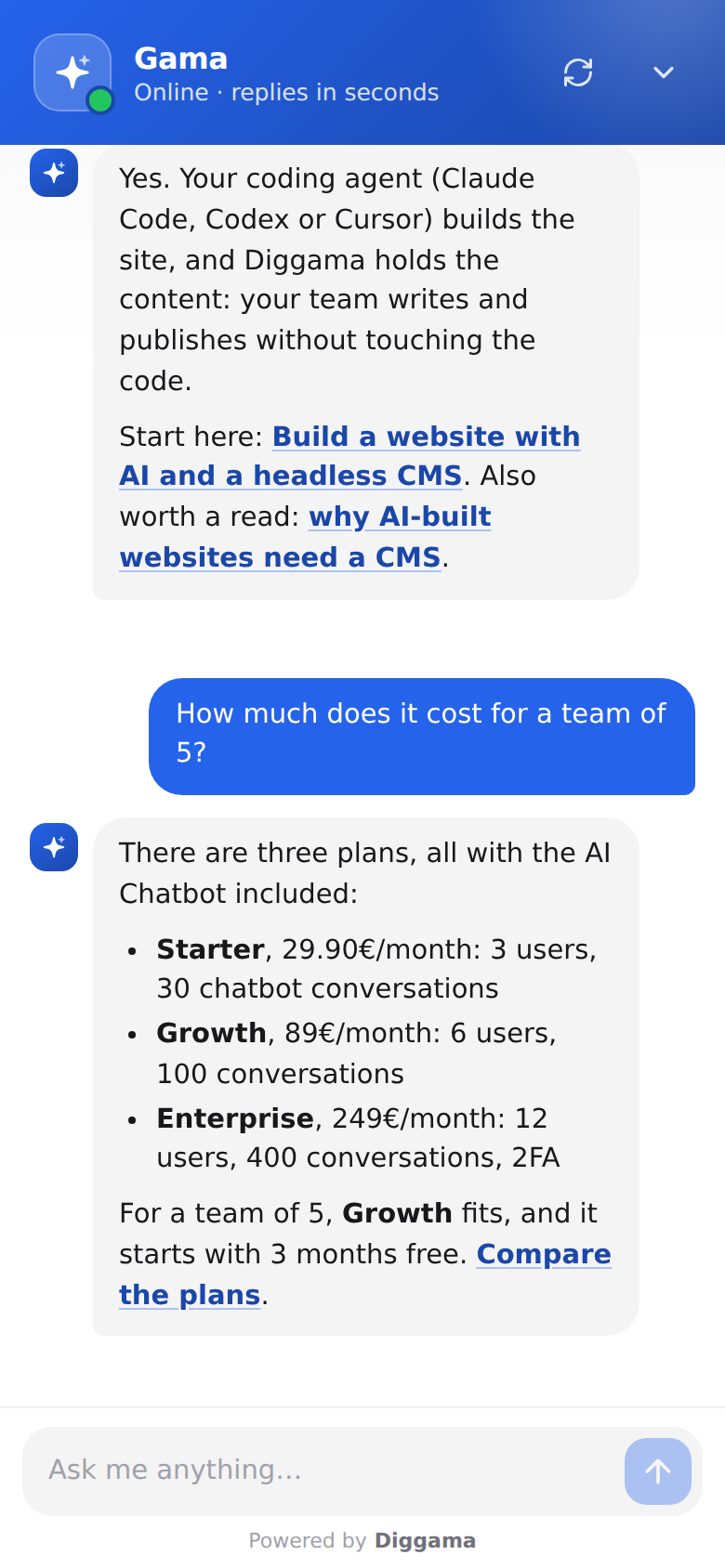
Put an assistant on your website that answers from what you publish in Diggama, day and night, with a link to the right page. Nothing to train: publish an entry and it is used from the next answer.
-
Answers only from your content
Your published entries, your website pages and your documents. When it does not know, it says so.
-
Links to your pages
Each answer can send the visitor to the page that says more.
-
Replies in their language
A question asked in German gets an answer in German, from the same content.
-

Turns chats into leads
Ask for a name and email, optionally or before the first message, and find them in Conversations.

AI Chatbot · Setup
Live on your site in five minutes.
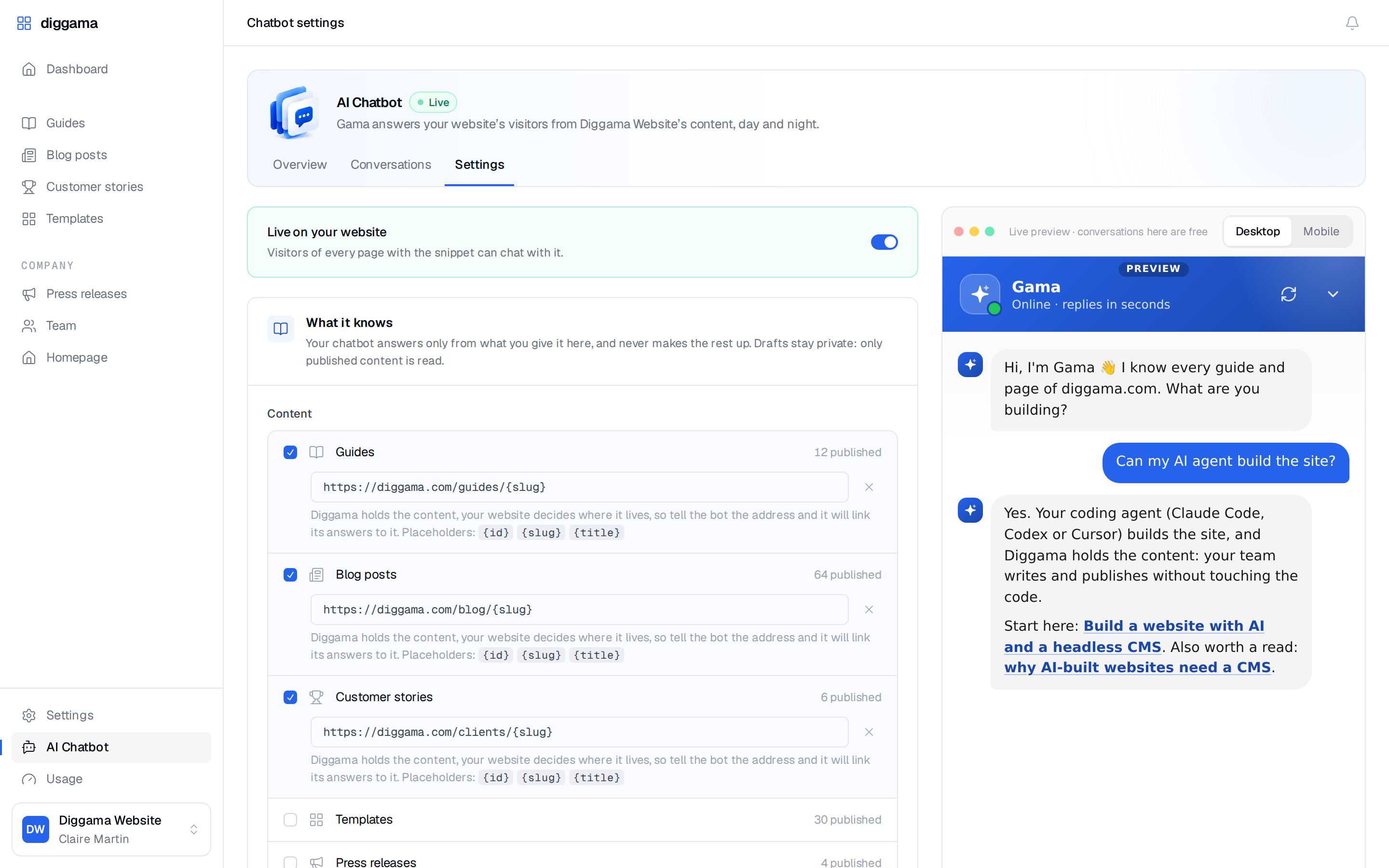
One Settings page, a live preview that follows as you type, and one line to paste. No code to write, on WordPress, Webflow, Astro, Next.js or plain HTML.
- 1
Tick your content types
Only published entries are read, and each type can link to its page on your site.
- 2
Add your sitemap and documents
Up to 100 pages of your website, plus the FAQ, delivery terms or opening hours.
- 3
Write the instructions
Tone, what to recommend, what to avoid, how to reach a human.
- 4
Pick the look
Name, colour, position, a welcome message and up to four suggested questions.
- 5
Paste one line
Switch it on, save, and add the snippet to your site. Done.
The one line, before </body>
<script src="https://api.diggama.com/chat/widget.js"
        data-chatbot="cb_xxxxxxxx" defer></script>
Included in every plan
- 30 Starter
- 100 Growth
- 400 Enterprise
Conversations per month. One conversation is one visitor session, however many messages it holds, and tests from the preview are free. Need more? 49€ per 100 a month, on any plan.
Manage
Every entry, one list away.
View all your resources in a clean, organized list. Filter by status, search by title, and open any entry in a click.
- Quick search and filtering across every field
- Draft, Scheduled and Published statuses
- Bulk actions and pagination on large collections
Blog posts
128 entries · 3 variants
| Title | Status | Variant | Author | Updated |
|---|---|---|---|---|
| Headless CMS vs traditional CMS | Published | EN | CM | 2 min ago |
| How we model a product catalog | Scheduled | EN | JD | 1 h ago |
| Guide des webhooks | Published | FR | AL | Yesterday |
| Shipping content to mobile apps | Draft | EN | CM | Yesterday |
| Content modeling 101 | Published | EN | SR | 3 days ago |
| Release notes: Workflows | Published | EN | JD | 5 days ago |
| Migrating from WordPress | Draft | EN | AL | 1 week ago |
Create
A form your editors already understand.
Every blueprint becomes a form. Each field type gets its own input, so writers fill in content, not markup.
- Rich text editor with media support
- Images uploaded and optimized automatically
- Auto-save and revisions: nothing is ever lost
New blog post
Title *
Shipping content to mobile apps
Cover image
Body *
Status
Draft ▾
Publish at
Tue 24, 09:00
Revisions
- Currentnow
- Claire12 min
- Anna1 h

Content modeling
Three blueprint types, twelve fields. Any content.
Pick the type that matches how your content is structured, then compose it from fields, from plain text to references between resources.
-
Resource
A collection of entries. Perfect for blog posts, products or team members.
Blog postsProductsTeam -

SingularResource
A single, unique entry. Ideal for pages that exist only once in your app.
HomepageSettingsFooter -

ReadOnlyResource
View-only through the API. Data managed elsewhere, exposed through yours.
AnalyticsImportsFeeds
- Text Single or multiline
- RichText WYSIWYG editor
- Image Upload & optimize
- File Any file type
- Enum Predefined options
- Link URL validation
- Color Color picker
- Date Date picker
- DateTime Date and time
- Boolean True / false toggle
- Slug URL-safe string
- Reference Link resources
REST API
Your content, one request away.
API tokens scoped per blueprint and per ability. Filtering, sorting, search, pagination, bulk operations and export come built in.
Token abilities
- GET
/v1/resources/:blueprint - GET
/v1/resources/:blueprint/:id - GET
/v1/resources/:blueprint?variant=fr&sort=-created_at - POST
/v1/resources/:blueprint - PATCH
/v1/resources/:blueprint/:id
$ curl https://api.diggama.com/v1/resources/blog-posts \
    -H "Authorization: Bearer $DIGGAMA_TOKEN"
Team & automation
The right access for everyone. Actions on every change.
Team roles per project
Editors write and publish. Developers also shape blueprints and workflows. Administrators handle members, tokens and settings.

Workflows that react to content
When a resource is created, updated or deleted, check a condition and send an email or a webhook to any service.
Customers
Teams that ship content with Diggama.



We went from a rigid WordPress setup to shipping content in minutes. Our analysts write, hit publish, and it's live everywhere: site, app and newsletter, at the same time.
 Head of ContentCoinstancy
 Before Diggama, every landing page change was an engineering ticket. Now marketing owns the whole site. Engineers haven't touched a content deploy in months.
 Co-founderTonaily
 Pricing
Simple plans, no hidden fees.
Starter
For small teams getting started.
29,90€ /month
Billed monthly, cancel anytime
Get started- Up to 3 users
- 5 custom blueprints
- 1 API key
- AI Chatbot: 30 conversations / month
- Workflows
- MCP
- AI Assistant
Growth
PopularFor growing businesses and teams.
89€ /month
3 months free, no credit card
Start free trial- Up to 6 users
- 10 custom blueprints
- 3 API keys
- AI Chatbot: 100 conversations / month
- Workflows
- MCP
- AI Assistant
Enterprise
For larger teams with security needs.
249€ /month
Billed monthly, cancel anytime
Get started- Up to 12 users
- 25 custom blueprints
- 5 API keys
- AI Chatbot: 400 conversations / month
- Workflows
- MCP
- AI Assistant
- 2FA
- Priority support

What is a headless CMS?
A CMS that stores and manages your content but leaves the display to you. Instead of rendering pages, Diggama exposes your content through an API, so the same entries can feed a website, a mobile app, a newsletter or an AI agent.
How do I get my content out of Diggama?
Through the REST API. Each token is scoped per blueprint and per ability (view, create, update, publish…), and every endpoint supports filtering, sorting, search, pagination and language variants.
Can I try Diggama before paying?
Yes. The Growth plan comes with a three-month free trial, and no credit card is required to start. You can cancel at any time.
Who on my team can do what?
Each project has three roles. Editors create, edit and publish content. Developers also manage blueprints, fields and workflows. Administrators invite users, manage API tokens and project settings.
Is there anything for AI tools?
Every plan includes an MCP server and the AI Assistant, so your content can be read and edited from the AI tools your team already uses. Connect Claude, Codex or Cursor over MCP →
What is the AI Chatbot?
An assistant on your website that answers visitors from your own content: the published entries of the content types you pick, your website pages through the sitemap, and the documents and instructions you add. It replies in the visitor's language, links to the right page and can collect contact details. Every plan includes it, with 30, 100 or 400 conversations a month and extra conversations at 49€ per 100 a month. See the AI Chatbot in action →
Can I build my site with Claude Code, Codex or Cursor?
Yes. Let the agent write the code, keep the copy, images and posts in Diggama, and your team edits the site without a prompt or a redeploy of the code. The guides walk through it with Astro and Next.js on Cloudflare. Build a website with AI, step by step →

Start building your
content API today.
No credit card required · 3 months free trial · Cancel anytime