A chatbot that answers from a general model knows a lot about the world and nothing reliable about you. Ask it your delivery times and it will produce a plausible number. A chatbot that answers from your own content knows only what you gave it, which is exactly what a visitor on your site needs: your prices, your terms, your articles, with a link to the page.
This guide explains why grounding matters (freshness, links, privacy, control), how to write content that makes good answers, and how to set up Diggama’s AI Chatbot on any website in about fifteen minutes. If you are still deciding whether a chatbot is worth it, start with the benefits and limits of an AI chatbot on your website.
What does “answering from your own content” mean?
It means the model writes each answer from a body of knowledge you control, and is told to use nothing else. The model supplies language: understanding the question, writing a clear reply in the visitor’s language. Your content supplies the facts.
The technique has a name, retrieval-augmented generation or RAG, from a 2020 paper by Lewis and colleagues. For each question, the system finds the passages of your knowledge that best match it and hands them to the model with the question. When the knowledge is small, there is no need to pick: Diggama gives the model all of it with every question, and switches to the best-matching passages once it grows.
The knowledge itself has four sources in Diggama:
- Published entries of the content types you tick (blog posts, services, team members).
- Pages from your sitemap, up to 100, for content that lives outside the CMS.
- Documents you write for the chatbot: an FAQ, delivery terms, opening hours.
- Instructions: tone, handover rules, and any facts you write in them.
Why not let a generic model answer?
Because a generic model’s knowledge is old, unlinked and not yours. It was trained on a snapshot of the web, may never have seen your site, and has no way to tell your current offer from last year’s.
| Generic model with your logo | Chatbot grounded in your content | |
|---|---|---|
| Source of facts | Training data, frozen at a date | Your published content, documents and instructions |
| A new page | Unknown until a new model ships | Used from the next answer |
| Links | Invented or none | To the page the answer came from |
| Unknown question | Answers anyway | Says it does not know, gives your contact details |
| Off-topic question | Answers it, on your bill | Politely declines |
| Your drafts | Not applicable | Never read |
Freshness: no training, the next answer knows
Training or fine-tuning a model on your content sounds thorough, but it bakes in a snapshot. Every edit means training again. A grounded chatbot reads your content when it answers. Diggama’s checks before each answer whether your content or documents changed and, if so, reads them again; Learn now forces it. Fix a price at 10:00, and the 10:01 visitor gets the new one. Pages read through the sitemap are refreshed every night, or straight away with Read again.
Links: answers that lead to your pages
An answer that ends with a link sends the visitor to the page with the detail, the images and the call to action. For CMS entries, the chatbot needs to know where each one is published, which only your website decides. In Diggama you give each content type a page address pattern once, such as https://www.example.com/blog/{slug}. Any text field of the content type can be a placeholder, plus {id}. Pages read through the sitemap need no setup: their address is already known.
Privacy: drafts stay drafts
A CMS holds more than what is live: the post scheduled for Tuesday, the price change waiting for approval. A chatbot that reads everything leaks all of it. Diggama’s reads only published entries, so drafts and scheduled entries stay private until they go live. Documents are different: they are read as soon as you save them, so keep internal notes out of them.
Instructions: tone, priorities and handover
Instructions are where you tell the chatbot how to behave, in plain language. They take up to 8,000 characters, and facts written there are known too. A useful set covers four things:
We are Northwind Studio, a web agency in Lyon and Paris. We design and build
websites for growing companies.

Tone: friendly and direct, short answers, no jargon. Use "we".
Push: the free 30-minute discovery call. Link to the contact page when someone
asks about a project.
Avoid: never quote a price for a custom project, never promise a launch date.
Handover: for anything about an existing contract or invoice, ask the visitor
to write to [email protected]. We answer within one working day.
Keep instructions about behaviour. Facts belong in your pages or documents, where editors can find and update them.
How do you write documents and FAQs that make good answers?
Write for retrieval: each question with its answer, self-contained, so that one passage pulled out of context is still complete and correct. Documents in Diggama are plain text or Markdown, up to 50,000 characters each, and questions with answers work best.
Six rules:
- One question per heading, in the visitor’s words. “How long does delivery take?” rather than “Logistics”.
- Fact first. Start the answer with the number, the yes or the no.
- Spell out conditions and exceptions. “Free delivery from 50€ in mainland France, 6,90€ below” beats “free delivery on most orders”.
- No references to other answers. “As mentioned above” means nothing to a passage read on its own.
- One fact, one place. If opening hours appear in a document and on three pages, they will eventually disagree, and the chatbot cannot know which is right.
- Link to the page. End with the address that has the full detail.
A weak entry and a strong one:
## Delivery
See our shipping page. Usually quick, depends on the destination
and the period. Contact us for more.## How long does delivery take?
Orders placed before 14:00 on a working day ship the same day.
Delivery takes 2 to 3 working days in mainland France and 4 to 6 in
the rest of the EU. We do not ship outside the EU.
Details: https://www.example.com/delivery
## Is delivery free?
Delivery is free from 50€ in mainland France. Below 50€ it costs 6,90€.
For the rest of the EU, the price is shown at checkout.The first version gives the model nothing to answer with, so a careful chatbot says it does not know. The second answers four questions precisely.
How do you set it up in Diggama?
The setup takes a Developer or Administrator about fifteen minutes. Editors can then follow the conversations.
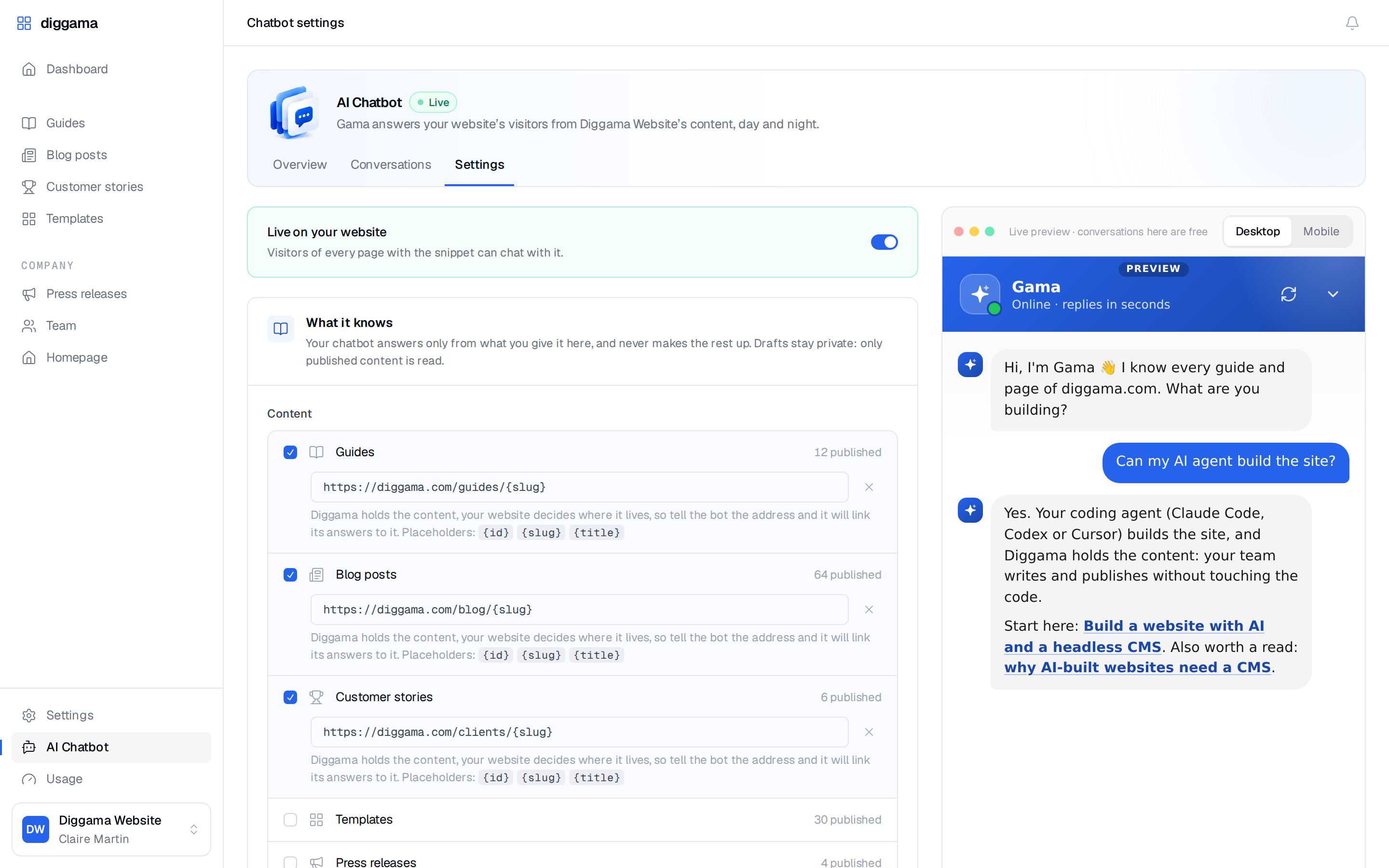
- Pick what it knows. In AI Chatbot › Settings, under What it knows, tick the content types it should read, for example Posts and Services.
- Link to your pages. Click Link to your pages next to each content type and enter its page address, such as
https://www.example.com/blog/{slug}. - Add your sitemap. Switch on Use your website’s sitemap to enrich answers and paste
https://www.example.com/sitemap.xml, or just your website’s address: Diggama finds the sitemap throughrobots.txt, then/sitemap.xmland/sitemap_index.xml. Up to 100 pages on that domain are read, shallowest first. - Add documents for what is not on your site yet: the FAQ, delivery terms, opening hours.
- Write the instructions, as above.
- Set the look. A name, a colour (eight presets or any hex code), bottom left or right, a welcome message (also shown as a small nudge bubble) and up to four suggested questions that visitors tap to ask.
- Choose lead capture. Never, Optional (name and email with a Skip button) or Required (an email before the first message).
- Switch it on and save, then install the snippet before
</body>on every page where the chat should appear:
<script src="https://api.diggama.com/chat/widget.js" data-chatbot="cb_xxxxxxxx" defer></script>It works on WordPress, Webflow, Astro, Next.js or plain HTML. The widget is isolated from your styles, adapts to phones and keeps the conversation when the visitor changes page. To open it from your own button, call DiggamaChat.open(). Under Allowed domains, list your domains so the snippet only works on your site.
How do you test it before visitors do?
Use the live preview in Settings: preview conversations are free and labelled Test. Ask four kinds of question:
- Your top ten real questions, from your inbox. Each answer should be correct and link to the right page.
- Questions you have not answered anywhere. The right reply is “I don’t know” with your contact details.
- Off-topic questions, such as a recipe or a homework problem. It should decline.
- A question in another language. The answer should come back in that language.
When an answer is wrong, fix the content it came from rather than adding a correction to the instructions. The page is wrong for human visitors too.
How do you keep it accurate after launch?
Treat conversations as editorial feedback. Once a week, open Conversations, filter on Unhelpful answers and read what was asked. Each one points to a page to fix, a document to extend or a question to answer for the first time. Because nothing is trained, the fix takes effect from the next answer.
The AI Chatbot is included in every Diggama plan, metered in conversations: 30 a month on Starter (29,90€ /month), 100 on Growth (89€ /month, 3 months free trial) and 400 on Enterprise (249€ /month), with extra conversations at 49€ per 100 conversations / month on any plan. See pricing and the chatbot documentation for every setting.